Built-in tools
The capabilities every Corint conversation ships with, and how to watch them run.
Corint gets things done by using tools: searching the web, reading a file, running code. Some tools connect to outside services and need setup. A core toolset ships with Corint itself and is always on. This page covers that core set, and where to see the rest.
The Built-in section
Open Integrations in the Corint sidebar. The page opens on the Browse tab, and the first section is Built-in. These tools are always on. They ship with Corint, and require no connection to function.
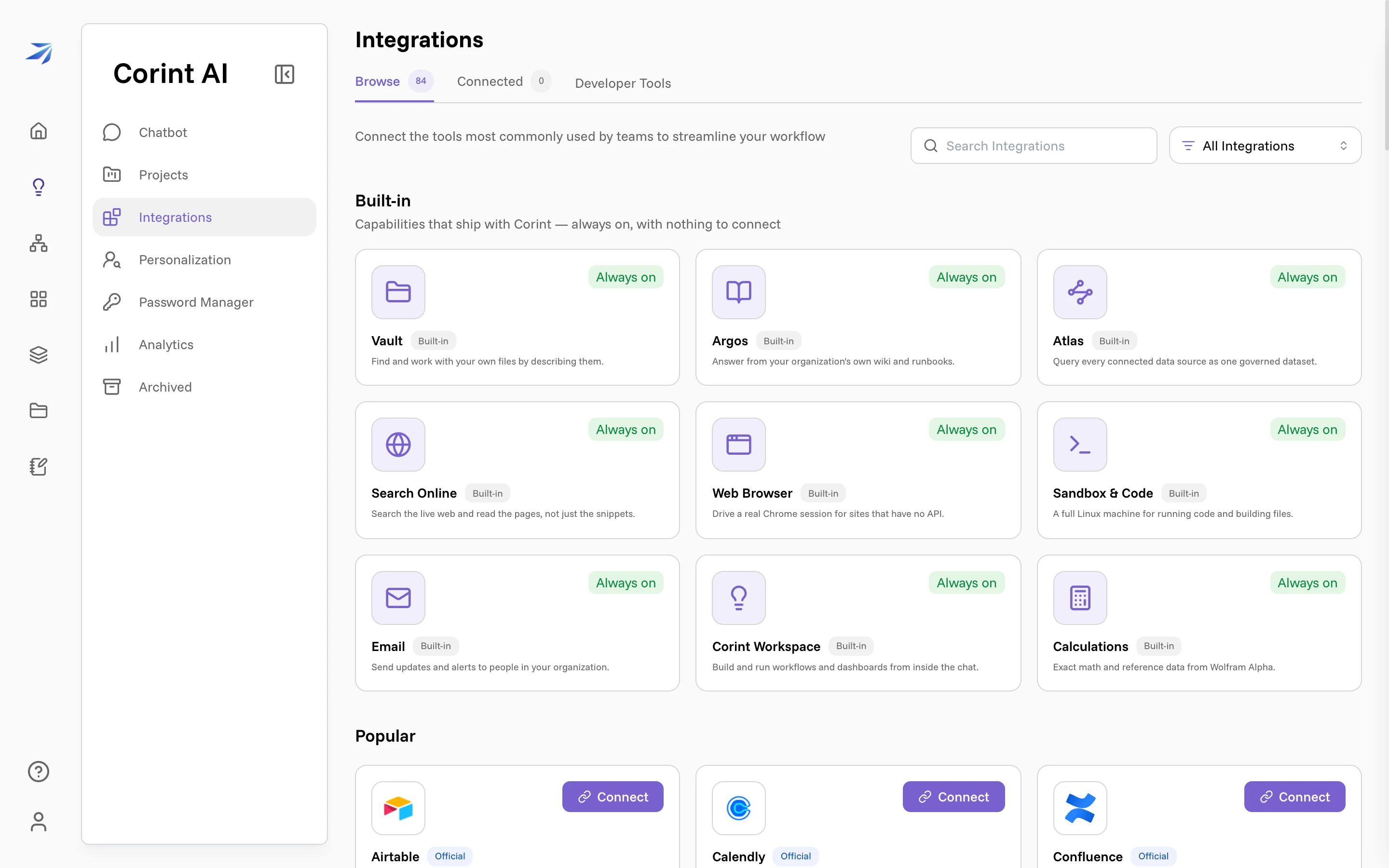
Each card's description is exact:
| Capability | What it does |
|---|---|
| Vault | Find and work with your own files by describing them. |
| Argos | Answer from your organization's own wiki and runbooks. |
| Atlas | Query every connected data source as one governed dataset. |
| Search Online | Search the live web and read the pages, not just the snippets. |
| Web Browser | Drive a real Chrome session for sites that have no API. |
| Sandbox & Code | A full Linux machine for running code and building files. |
| Send updates and alerts to people in your organization. | |
| Corint Workspace | Build and run workflows and dashboards from inside the chat. |
| Calculations | Exact math and reference data from Wolfram Alpha. |
Argos and Atlas carry one caveat the cards don't state: both are enabled per organization. If your organization has not switched them on, Corint cannot reach them.
Two of these behave differently than the one-line card suggests. Email always drafts first and sends as a second step; in a chat Corint shows you the draft and waits for you to confirm, while inside a workflow run the step's own instruction is the authorization, so it sends without stopping to ask. Message bodies are written in markdown and arrive as formatted HTML. Search Online also searches images, not just pages, when the request needs an actual picture.
You never invoke these by name. Ask for an outcome and Corint picks what the task needs: a market question brings in Search Online, "chart this spreadsheet" brings in Vault and Sandbox & Code, a question about company policy brings in Argos. Several of them have their own pages: Files and context for Vault and Argos, What is the Desktop for the sandbox and browser, What is Atlas for governed data.
Watching a tool run
Every tool call shows up in the chat as a step line while Corint works. Each step is a record you can open — click one and it shows the exact input the tool received:
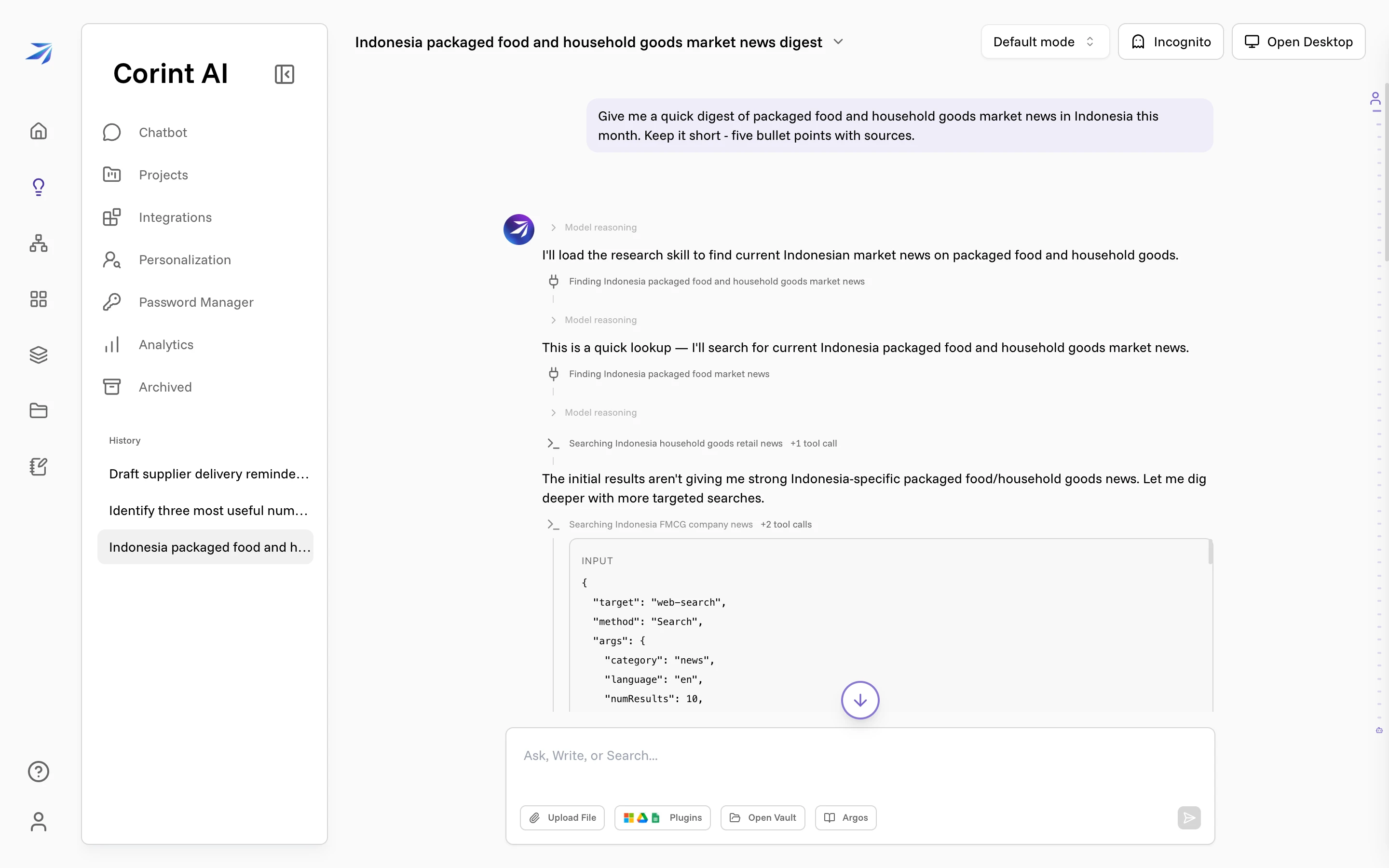
Here a step labeled "Searching Indonesia FMCG company news" turns out to be a news-category web search for ten results. You'll rarely need this level of detail, but when an answer matters, the record of how it was produced is one click away.
Beyond the built-ins
The rest of the Browse tab is the catalog of connectable integrations: Airtable, Confluence, GitHub, Gmail, Google Drive, HubSpot, Jira, and dozens more, each with a Connect button. Once connected, they become tools Corint can use in your chats the same way, and they appear under the Connected tab.
What Corint may do with any of these tools (read, write, delete, and when it must ask you first) is its own subject: Tool permissions.