API keys and webhooks
Trigger a workflow from another system, follow the run, and get called back when it ends.
A workflow does not have to start in Futurity. Give one an API key and any system that can make an HTTPS request can run it: a form handler, a nightly job, a CRM automation, a webhook from your own product. The run behaves exactly as it does in the browser, and you can be called back when it finishes.
Keys are per-workflow: a key can trigger the workflow it was made for and nothing else. To let an app act across the API as a signed-in Futurity user instead, register an OAuth app.
Get a key
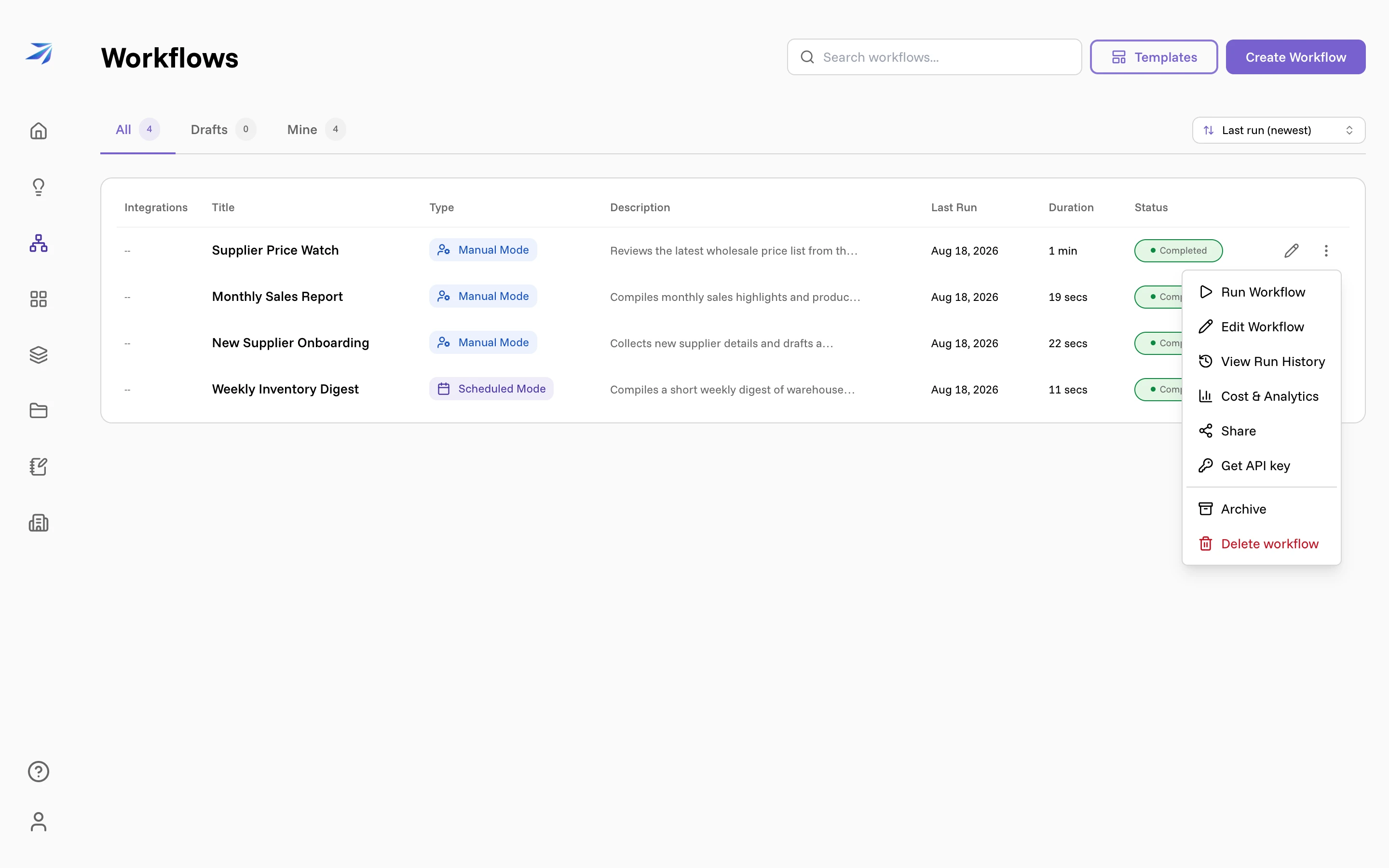
On the Workflows page, open the menu on the workflow's row and choose Get API key.
The External API key dialog opens on the workflow you picked, and names it:
"Create a secret key so other systems can run Supplier Price Watch via the
API using Authorization: Bearer."
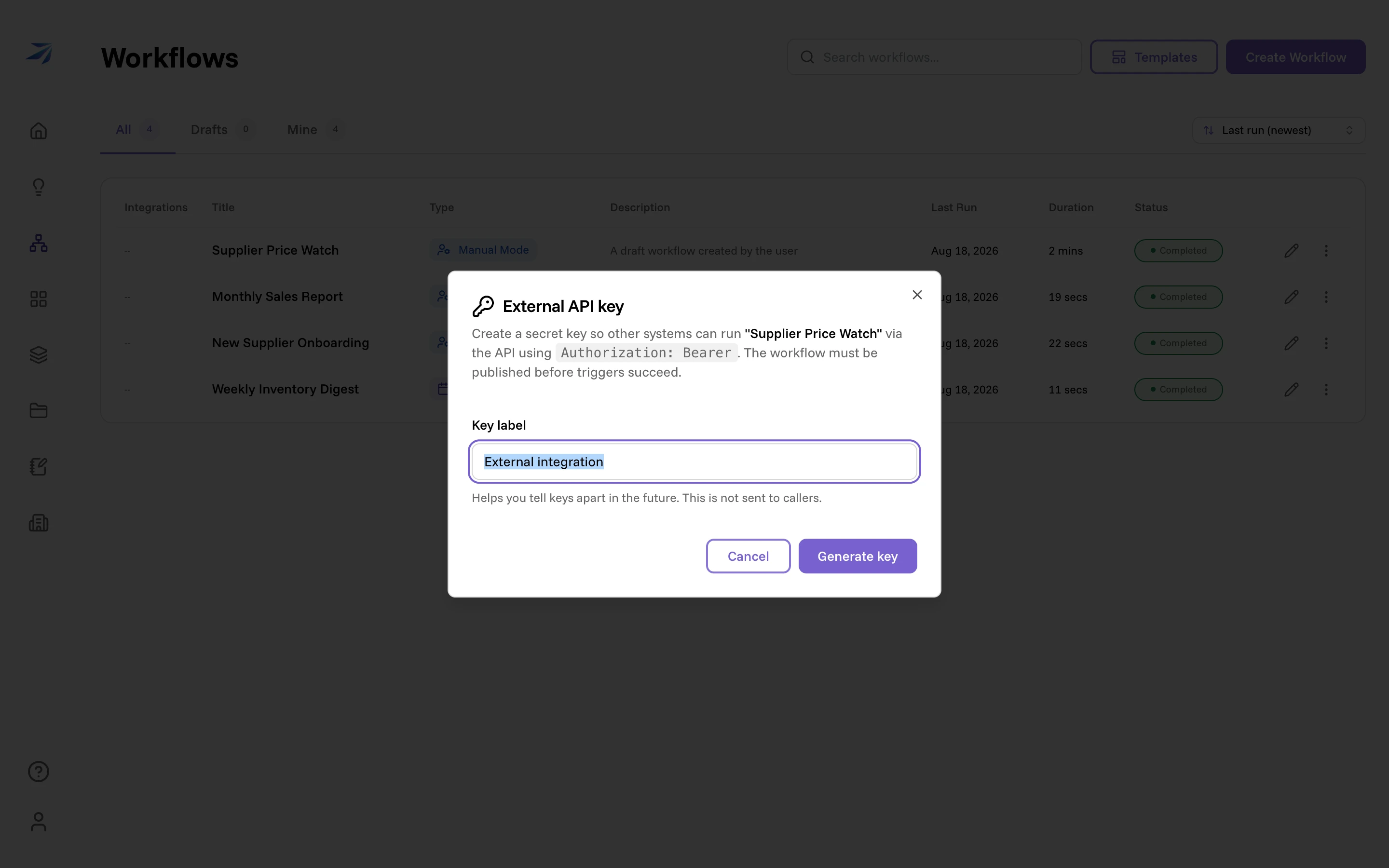
Give the key a Key label — it is for you, not for callers — and click Generate key. The dialog then shows the key once, under a line worth believing: "Copy this key now. For security, it will not be shown again." Futurity keeps only a hash of it. Below the key, the dialog prints the exact Trigger endpoint for that workflow, so you can paste both straight into whatever is calling.
Keys start with fty_wf_ and go in an Authorization: Bearer header. The
workflow must be published before any trigger will succeed.
Keys are also managed over the API. Listing returns everything except the
secret, and creating a key there takes an optional expiresAt, after which it
stops authenticating. Revoking is immediate and permanent.
GET    /api/v3/workflows/{workflowId}/api-keys
POST   /api/v3/workflows/{workflowId}/api-keys
DELETE /api/v3/workflows/{workflowId}/api-keys/{keyId}
Trigger a run
POST /api/v3/workflows/{workflowId}/trigger
Authorization: Bearer fty_wf_…
Content-Type: application/json

{
  "callbackUrl": "https://hooks.example.com/futurity",
  "inputs": {
    "<nodeId>": { "text": "Q3 price list", "files": [] }
  }
}
Both fields are optional. inputs pre-fills
Human Input steps by node id, so a run that
would otherwise stop and wait can go straight through. callbackUrl is where
webhooks are sent, and it has rules: it must be HTTPS, and it must not point at
localhost, a private IP range, or a cloud metadata address. Anything else is
rejected before the run starts.
The response gives you the run and where to look:
{
  "runId": "225a9a45-9e40-4a60-b3c7-96e7bef3cc8f",
  "statusUrl": "https://…/api/v3/workflows/runs/225a9a45-9e40-4a60-b3c7-96e7bef3cc8f"
}
Triggering is rate limited to 60 requests per minute.
Follow the run
Poll statusUrl for the whole picture — the run's state and summary, plus
every step with its own state and result:
{
  "id": "225a9a45-…",
  "workflowId": "573bdf26-…",
  "state": "running",
  "summary": "Starting...",
  "duration": 0,
  "trigger": "manual",
  "jobs": [
    {
      "id": "9f100595-…",
      "nodeId": "1f3c3ae5-…",
      "state": "running",
      "summary": "Running...",
      "result": null
    },
    {
      "id": "02fbfb3c-…",
      "nodeId": "50de625f-…",
      "state": "pending",
      "summary": "",
      "result": null
    }
  ]
}
For something closer to live, open a server-sent event stream instead:
GET /api/v3/workflows/runs/{runId}/stream
Authorization: Bearer fty_wf_…
Each message is a JSON object with a type: state on connect, then
workflow and job events as things move, and a final done. A comment
heartbeat keeps the connection alive. If the run is already finished when you
connect, you get its state and done immediately.
Webhooks
Webhooks are delivered only when the run was started with an API key and a
callbackUrl. There are four events:
| Event | When |
|---|---|
awaiting_input | The run paused at a Human Input step |
completed | The run finished successfully |
failed | The run ended in failure |
cancelled | The run was cancelled |
Each delivery is a POST to your callback URL:
POST /your/callback
Content-Type: application/json
X-Futurity-Signature: sha256=<hex digest>
X-Futurity-Run-Id: 225a9a45-9e40-4a60-b3c7-96e7bef3cc8f
X-Futurity-Event: completed
{
"event": "completed",
"run_id": "225a9a45-…",
"workflow_id": "573bdf26-…",
"state": "completed",
"summary": "…what the run concluded…",
"duration": 42
}An awaiting_input delivery carries three more fields: task_name and
job_id for the step that is waiting, and resume_url — a signed, single-run
URL you can post the answer to.
Verifying the signature
X-Futurity-Signature is sha256= followed by an HMAC-SHA256 of the exact
raw request body. The secret is the SHA-256 digest of your API key (not the
key itself), in lowercase hex — the same value Futurity stores. Compute it
once and keep it beside the key.
import crypto from "node:crypto";

const secret = crypto.createHash("sha256").update(apiKey).digest("hex");
const digest = crypto
  .createHmac("sha256", secret)
  .update(rawBody)
  .digest("hex");

const expected = `sha256=${digest}`;
const header = request.headers["x-futurity-signature"] ?? "";
const ok =
  header.length === expected.length &&
  crypto.timingSafeEqual(Buffer.from(header), Buffer.from(expected));
Compare the digests before parsing the body, and reject anything that does not match.
Delivery and retries
Return a 2xx quickly. Anything else — including a timeout — counts as a failed delivery, and Futurity retries: up to five attempts with exponential backoff, each attempt cut off after 30 seconds. Treat deliveries as at-least-once: a retry repeats the same run id and event, so make the handler safe to run twice on that pair.
Answering a paused run over the API
When an awaiting_input webhook arrives, the run is sitting and waiting. Post
the answer to the resume_url from that payload:
POST <resume_url>
Authorization: Bearer fty_wf_…
Content-Type: application/json

{
  "input": {
    "text": "Approved. Send the notice to the Jakarta accounts.",
    "files": []
  }
}
The run continues from where it stopped, exactly as if a person had clicked Submit & Resume in the browser. The URL is signed against your key, so a tampered or borrowed link is refused, and the run has to still be paused.