Connect with OAuth
Futurity is an OAuth 2.0 and OpenID Connect provider — register an app, request scopes, and act on a user's behalf with standard flows.
Futurity is a full OAuth 2.0 and OpenID Connect (OIDC) provider. If you are building an application that a Futurity user signs in to, and that then acts on their behalf (reading their workflows, writing to their vault, using their Futurity identity to log them in), you register an OAuth app and use the standard flows.
This is the inbound direction
Two other pages point the other way. A plugin is Corint reaching out to another system; a workflow API key lets another system trigger your workflow. OAuth here is a third-party app reaching into Futurity as a signed-in user.
Register an app
OAuth apps live in the developer portal, under Developers → OAuth Apps.
Access to it needs plugin-developer access: either the manage:developerApps
organization permission, or a platform grant Futurity hands to one account. See
Roles and permissions for who holds
it in your organization.
Click Create App and fill in the app's name, an optional description and logo, one or more redirect URIs, and the scopes it is allowed to request.
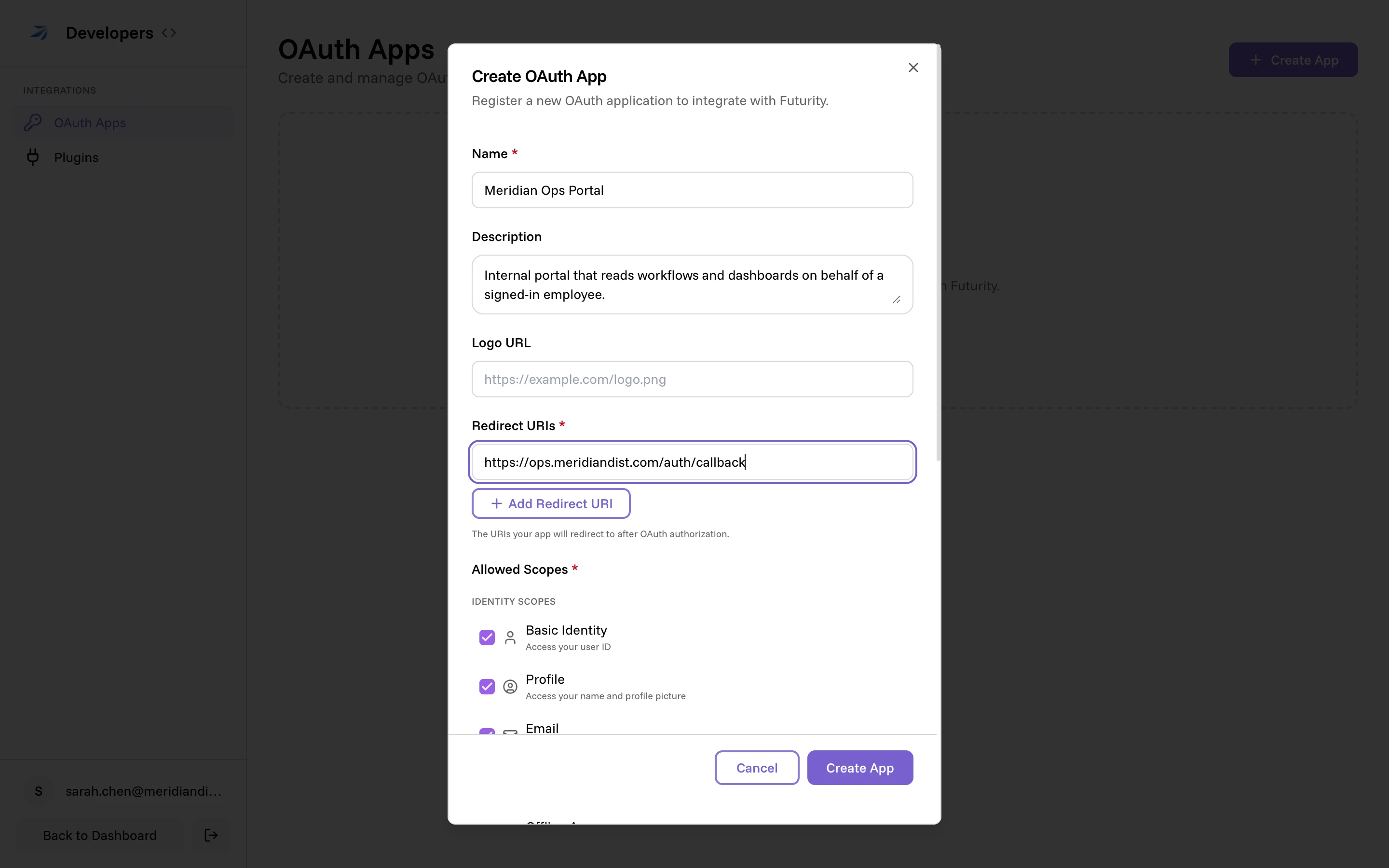
The redirect URIs are the exact addresses Futurity will send the user back to after they approve — a request that names any other address is rejected.
Pick the allowed scopes
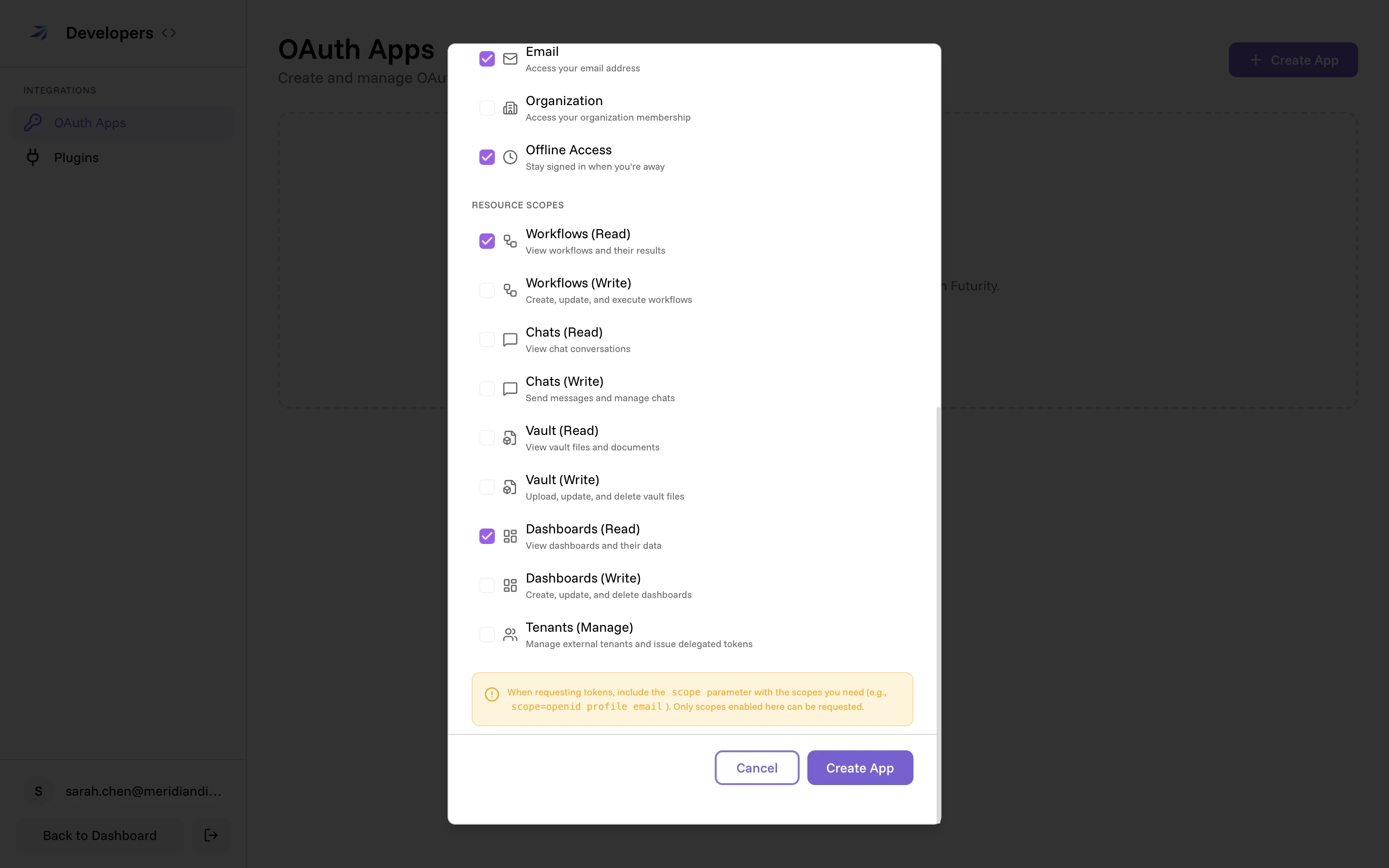
The scope selector is the app's ceiling: only scopes you enable here can ever be requested at sign-in. Enable the least the app needs.
Save the credentials
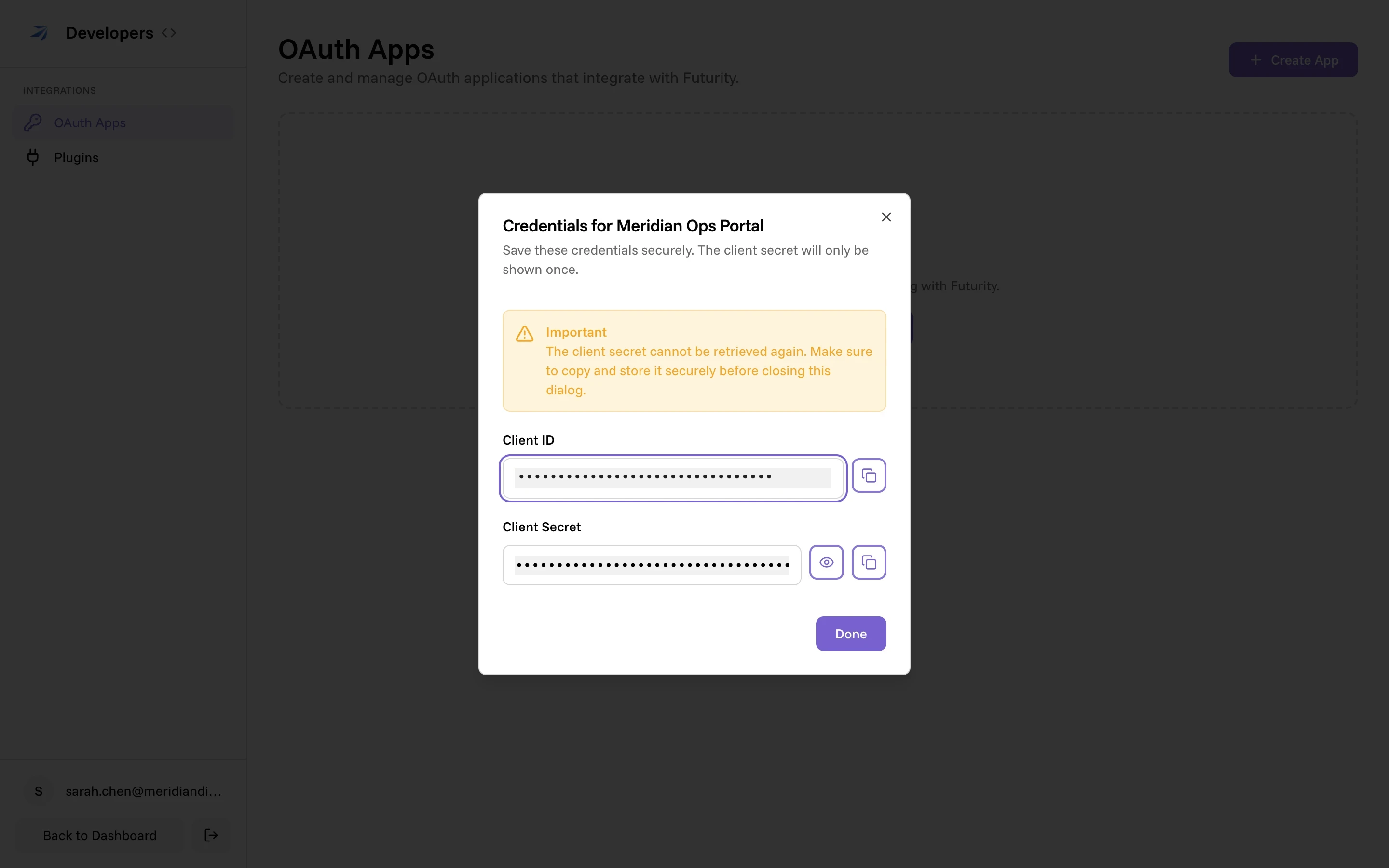
Creating the app returns a client ID and a client secret. The client ID identifies your app in every request; the secret authenticates it. The secret is shown once — store it somewhere safe before you close the dialog. If it leaks or is lost, use Regenerate secret on the app to rotate it.
Confidential and public clients
An app created in the portal is a confidential client with PKCE required, shown by the two tags on its card.
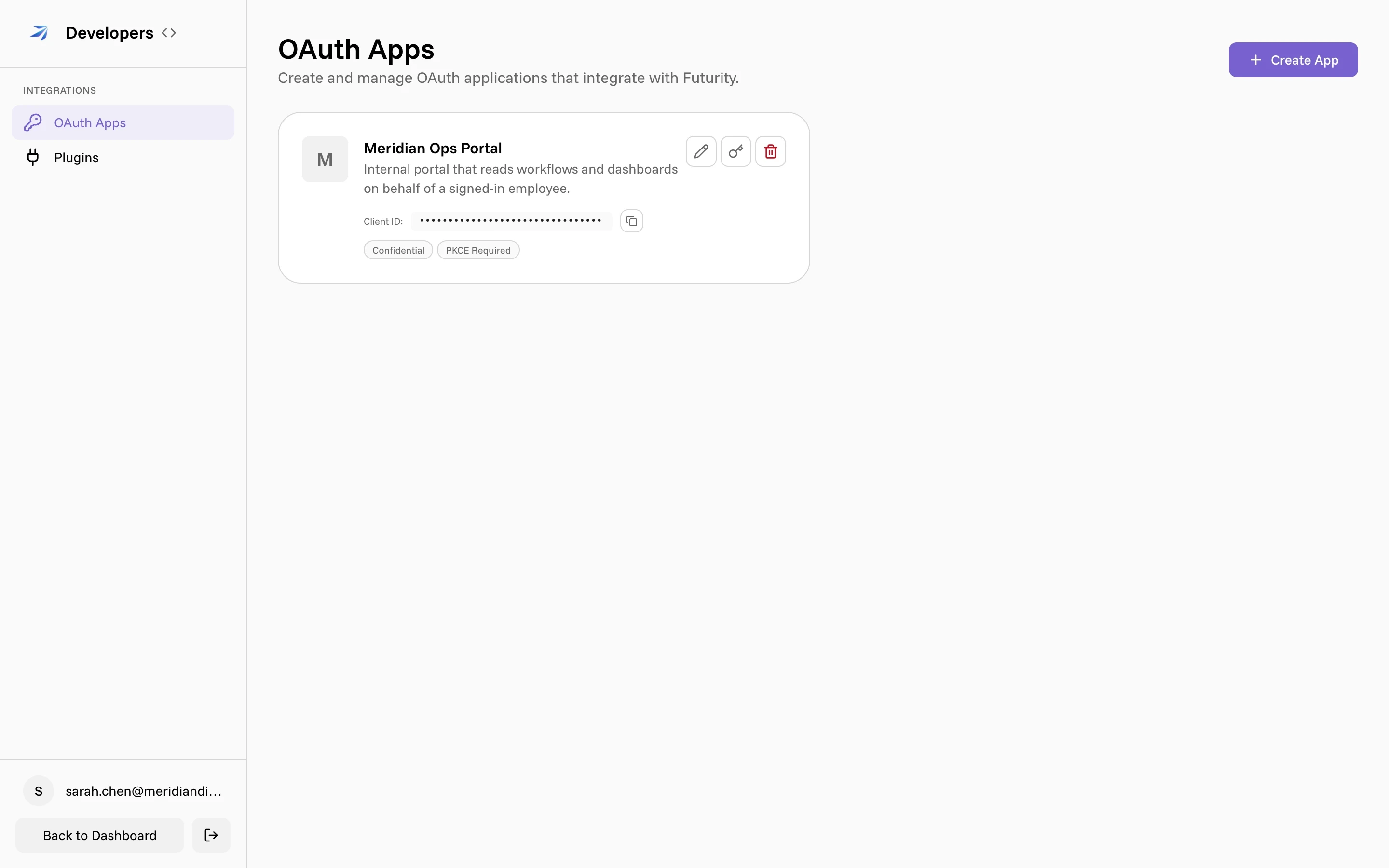
- A confidential client can keep the secret private — a server-side app. It authenticates to the token endpoint with its secret.
- A public client cannot keep a secret — a single-page app or a mobile app. It has no usable secret and must use PKCE.
PKCE (Proof Key for Code Exchange, method S256) binds the authorization
request to the token request, so an intercepted code is useless without the
original verifier. It is required for public clients, and for any other app that
keeps the PKCE Required flag on — the default at registration. Send a
code_challenge on the authorize request and the matching
code_verifier on the token request.
Scopes
A scope is one permission. Request them space-separated in the scope
parameter.
| Scope | In the portal | Grants |
|---|---|---|
openid | Basic Identity | Sign-in; required for an ID token |
profile | Profile | Name and profile picture |
email | Email address and its verified flag | |
organization | Organization | Organization id and name |
offline_access | Offline Access | A refresh token |
workflows:read / workflows:write | Workflows | View, or create/update/run, workflows |
chats:read / chats:write | Chats | View, or send and manage, chats |
vault:read / vault:write | Vault | View, or upload/update/delete, vault files |
dashboards:read / dashboards:write | Dashboards | View, or create/update/delete, dashboards |
atlas:write | Atlas (Write) | Manage Atlas sources, entities, and builder chat |
tenants:manage | Tenants (Manage) | Manage external tenants and issue delegated tokens |
The openid, profile, email, and organization claims are returned from
the /oauth/userinfo endpoint and, when openid is present, inside the ID
token. The authoritative list for a deployment is the scopes_supported array
in its discovery document.
Grant types
Futurity supports four ways to obtain tokens.
- Authorization code — a user signs in and approves your app. The standard flow for anything acting on a person's behalf. Use it with PKCE.
- Refresh token — trade a refresh token for a fresh access token without
sending the user back through sign-in. You only receive a refresh token if the
app requested
offline_access, and each refresh rotates the token: the old one stops working and a new one comes back. - Client credentials — an app authenticates as itself, with no user. For
service-to-service work. It requires a confidential client, and
openidandoffline_accessdo not apply. - Delegated tokens — a client-credentials app holding
tenants:managecan call/oauth/token/delegateto mint a short-lived token (up to one hour) for a named external tenant and user. This is for platforms that broker Futurity access to their own end users. A delegated token carries only the workflow, chat, vault and dashboard scopes;atlas:writeandtenants:manageare not delegable.
The endpoints
Every endpoint lives under your Futurity API base URL. The discovery document lists their exact addresses for a given deployment.
| Endpoint | Method | Purpose |
|---|---|---|
/oauth/authorize | GET | Start the authorization code flow; shows sign-in and consent |
/oauth/token | POST | Exchange a code, refresh token, or client credentials for tokens |
/oauth/introspect | POST | Report whether a token is active; confidential clients only |
/oauth/revoke | POST | Revoke an access or refresh token |
/oauth/userinfo | GET | OIDC claims for the bearer of an access token |
/oauth/jwks | GET | Public keys for verifying ID tokens (RS256) |
/oauth/token/delegate | POST | Issue a delegated token for an external tenant user |
/.well-known/openid-configuration | GET | Discovery document listing all of the above |
The token endpoint accepts client authentication as client_secret_basic (an
HTTP Basic header), client_secret_post (fields in the body), or none (a
public client). ID tokens are signed with RS256; verify them against
/oauth/jwks.
Rate limits
The authorization endpoint allows 30 requests per minute, token exchange and
revocation allow 20 each, and introspection allows 100. These limits are per
connection IP address when available. Clients reaching the API through the same
proxy connection address can therefore share a budget. A throttled request
returns HTTP 429; pause before retrying.
OAuth accepts IPv4 and IPv6. Only when no connection address is available does
it use the first X-Forwarded-For entry if valid, falling back to a valid
X-Real-IP. If neither supplies a valid address, requests share the route's
fallback budget. Header validation checks address syntax, not authenticity.
See API rate limits for the global quota and public form limits.
The authorization code flow
Send the user to authorize
Redirect them to /oauth/authorize with client_id, redirect_uri,
response_type=code, your scope, a random state, and a PKCE code_challenge
with code_challenge_method=S256.
GET /oauth/authorize
  ?client_id=YOUR_CLIENT_ID
  &redirect_uri=https://yourapp.example.com/auth/callback
  &response_type=code
  &scope=openid%20profile%20email%20workflows%3Aread
  &state=RANDOM_STATE
  &code_challenge=BASE64URL_SHA256_OF_VERIFIER
  &code_challenge_method=S256
The user signs in and consents
If they are not already signed in, Futurity asks them to. Then, unless your app is first-party, they see the consent screen — the app's name and the exact permissions it is asking for.
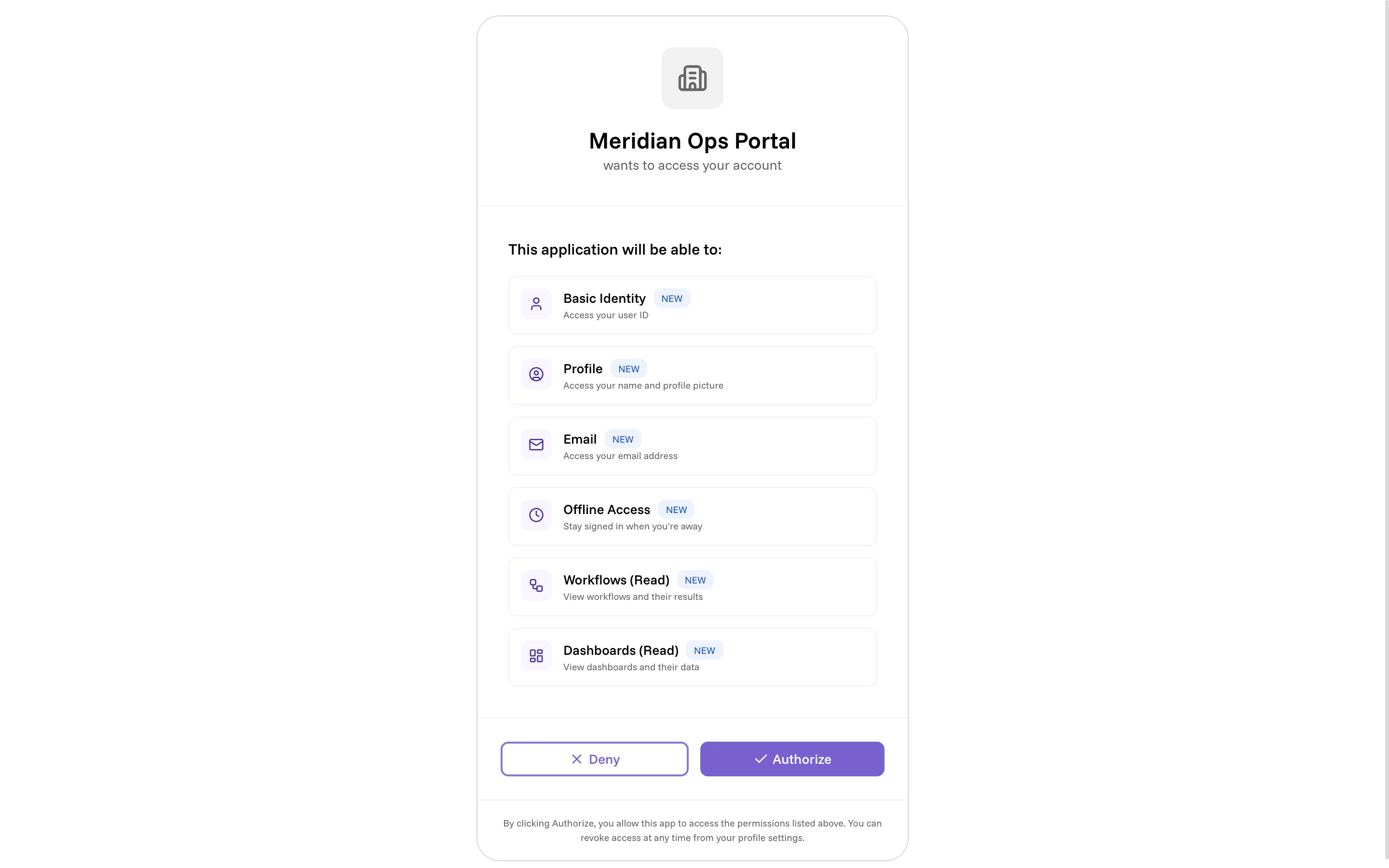
Approving sends them back to your redirect_uri with code and state in the
query. Verify the state matches what you sent.
Exchange the code for tokens
POST the code to /oauth/token with grant_type=authorization_code, the same
redirect_uri, and your PKCE code_verifier. A confidential client also
authenticates with its secret.
POST /oauth/token
Content-Type: application/x-www-form-urlencoded

grant_type=authorization_code
&code=THE_CODE
&redirect_uri=https://yourapp.example.com/auth/callback
&code_verifier=THE_ORIGINAL_VERIFIER
&client_id=YOUR_CLIENT_ID
&client_secret=YOUR_CLIENT_SECRET
The response carries an access_token (a Bearer token), its scope and
expires_in, an id_token when openid was requested, and a refresh_token
when offline_access was. Call the API with Authorization: Bearer <access_token>.
What the user controls
The user grants access on the consent screen, and takes it back from Authorized Apps in their account settings. Every app they have approved is listed there with the permissions it holds, and a Revoke button.
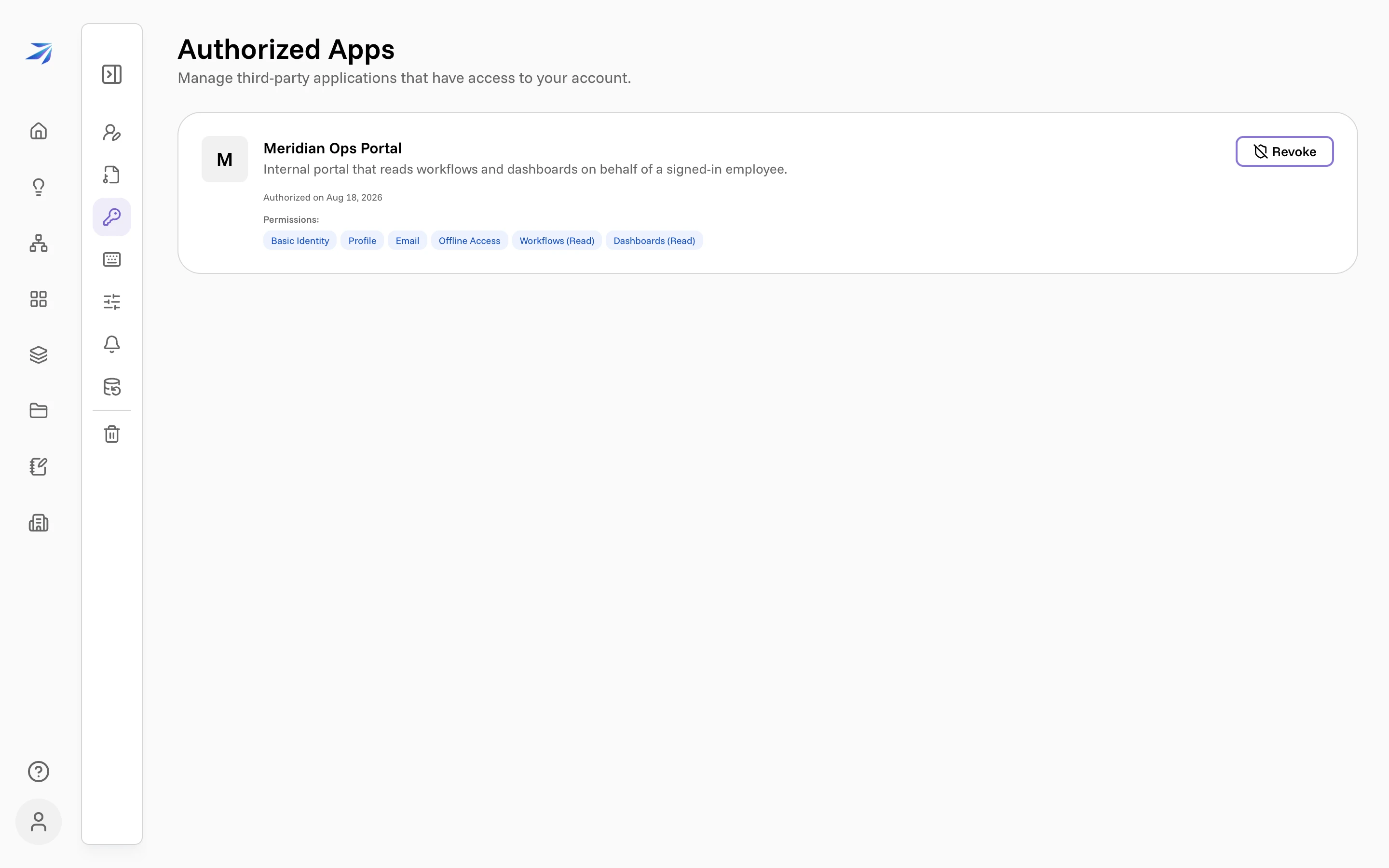
Revoking invalidates that app's tokens for the user immediately. Design for it: a live integration can lose access at any time, and the fix is to send the user back through sign-in.