Org-wide tool permissions
Block individual integration tools or require more cautious approvals across your organization.
Every member decides for themselves how freely Corint's tools may act in a chat — read, write, or no prompts at all. That's the right default for most work, and it's covered in Tool permissions.
Sometimes one particular tool deserves more caution than any personal setting will guarantee. A connected system where a delete is expensive, an action that posts to customers, a tool nobody should trigger without reading the request first. Org → Tool Permissions is where you say so once, for everyone.
How the decision is made
Each tool declares what it does: read, write, or delete. Some also declare that they need explicit consent, which means they ask every single time, no matter what mode the chat is in.
When Corint is about to use a tool, it compares that classification against the mode the chat is running in. Anything at or below the mode runs; anything above it stops and asks the person. Your override can raise a tool's classification or add the explicit-consent flag. A Blocked tool is excluded from new discovery and denied before invocation, including when a running chat already loaded it. Modes, grants, and explicit-consent bypass cannot override an organization block.
Overrides only ever go one way. The page says it outright: "Overrides can only escalate a tool's danger level, never downgrade it." The Save button stays disabled if you pick a level lower than the one the tool declared, with the reason on hover: "Admins can only escalate danger levels, not downgrade."
Set an override
Find the tool under Discoverable tools. Each row shows the tool's name, the plugin it came from, its Declared classification, and an Effective column where you choose a level, consent, or Blocked. Save writes the fields you edited. Other restrictions remain unchanged, including changes made by another administrator. Unsaved edits stay in place when the list refreshes.
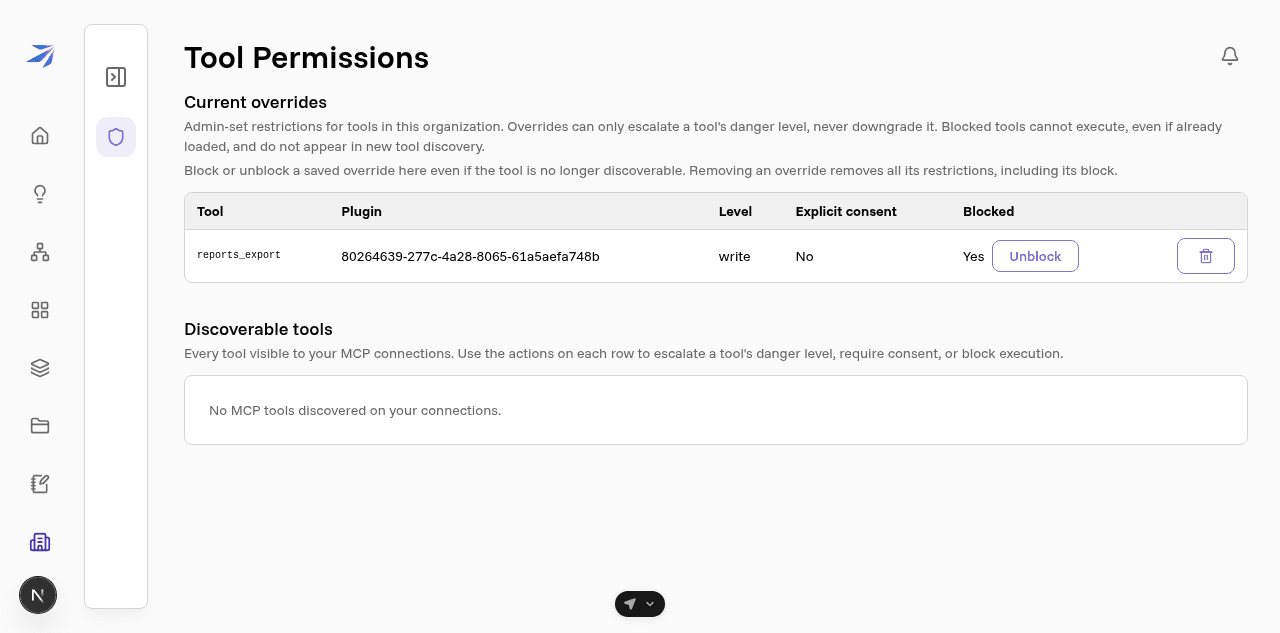
Saved overrides move to Current overrides at the top of the page, listed with tool, plugin, level, consent, and block status. Toggle the block here even if the tool is no longer discoverable from your connections. Removing the override also removes its block and restores the tool's declared policy.
For tools that are not blocked, a higher danger level may cause an approval prompt under the member's current mode — the same prompt described in Tool permissions, with Allow once, Deny, and Edit request. Nobody can lower your classification from their own Preferences.
For overrides that do not block a tool:
- A level escalation changes the classification checked against the member's mode. A permissive mode or saved grant can still allow the tool. Explicit consent asks every time regardless of grants, unless the member enables the separate explicit-consent bypass preference.
- Someone who has switched on Skip explicit-consent prompts in their own preferences won't see consent prompts at all. Level escalations still apply to them.
Where the list comes from
The Discoverable tools list is built from the integrations connected on your account (the admin looking at the page), so before you connect anything it reads "No MCP tools discovered on your connections", even when colleagues have connections of their own. Connect the integration you want to govern, reload the page, and its tools appear.
Corint's built-in tools (search, the Vault, the sandbox, and the rest) aren't listed here either. They carry their own classifications, and members control them with the chat mode.
Who can open this page
Tool Permissions appears in the Org navigation for anyone holding
manage:integrations, the same permission that lets you connect an integration
on behalf of the whole organization. See
Roles and permissions to grant it.
Blocks belong to the registered integration service. Removing that service from the catalog also removes its overrides; if it is recreated, administrators must apply its tool blocks again. Disconnecting a user's account does not remove the service or its organization overrides.