Preferences
Set your default tool permission mode, cookie choices, theme, and language.
The Preferences page (your avatar → Profile → Preferences) decides one genuinely important thing: how much Corint's tools may do on your behalf before asking you. The rest (cookies, theme, language) takes a minute to set and rarely needs revisiting.
Default tool mode
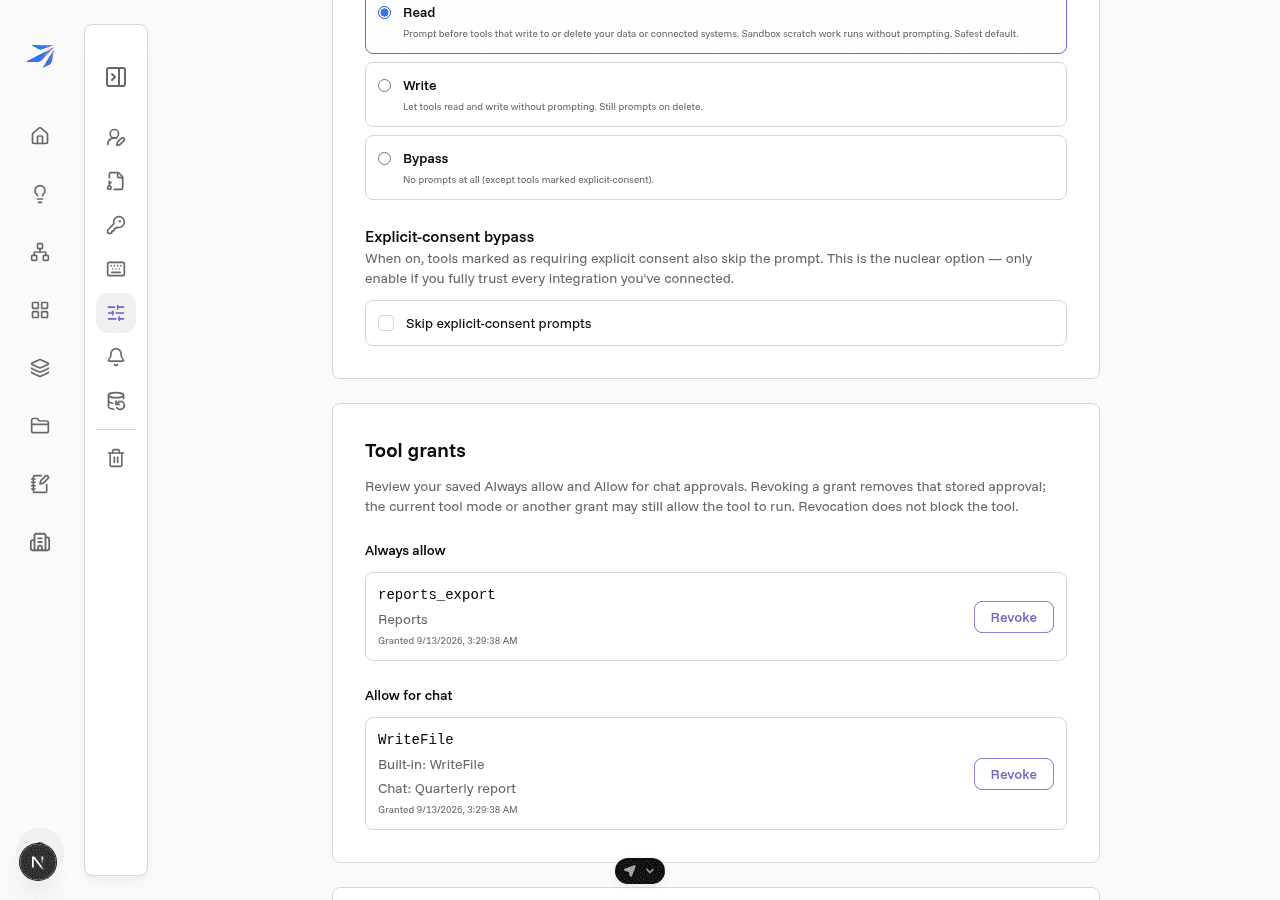
When Corint works for you, it uses tools: reading files, writing documents, sending requests to connected services. Before a tool does something with consequences, Futurity can pause and ask you first. The default tool mode sets where that line sits for every new chat you open. The three modes, exactly as the page describes them:
- Read — Prompt before tools that write to or delete your data or connected systems. Sandbox scratch work runs without prompting. Safest default.
- Write — Let tools read and write without prompting. Still prompts on delete.
- Bypass — No prompts at all (except tools marked explicit-consent).
This is a default, not a lock. Every chat has its own Tool permission mode selector in the header, so you can run one conversation more loosely (or more strictly) than your usual setting. How the prompts look in a chat, and how to answer them from the keyboard, is covered in Tool permissions.
Read is the right default for most people. Move up to Write once prompts about ordinary file edits start to feel like noise.
Explicit-consent bypass
Some tools are marked as requiring explicit consent — actions serious enough that they normally prompt even in Bypass mode. The Skip explicit-consent prompts checkbox removes that last safeguard. The page calls it "the nuclear option," and that's accurate: leave it off unless you fully trust every integration you've connected.
Tool grants
The Tool grants section lists approvals you saved with Always allow or Allow for chat. Each row identifies the tool, its service, and when you granted access; chat grants also identify the conversation. Only your grants and grants for chats you own appear here. Each page shows up to 20 grants in each section, newest first. Use Previous and Next to review the rest.
Choose Revoke to remove a saved approval. The next tool call checks the current grants, including in an already-running chat. Revocation does not block a tool: your current mode or another grant can still allow it. An organization block takes precedence over both modes and grants.
Privacy and cookies
The Privacy & cookies section shows whether analytics cookies are enabled and lets you change your answer with Manage cookie preferences — the same choice you made when you first signed in. Strictly necessary cookies are always on; without them, logging in doesn't work.
Theme and language
Two settings live in the user menu rather than on this page. Click your avatar and pick:
- Theme — Light, Dark, or System, which follows your operating system.
- Language — English or Bahasa Indonesia. Dashboard navigation, home, and Corint composer surfaces follow this setting; some legacy screens remain in English while localization expands.
Both apply immediately.