Source kinds
The 18 systems Atlas connects to, what each one asks you for, and how files and connected accounts differ from databases.
Select Data Sources lists every kind Atlas can connect to. They fall into four families, and the family tells you what the form will ask for: a connection URL, a structured credential, a file from your Vault, or an account you've already connected to Futurity.
Every kind is read-only: Atlas opens the connection, reads structure and rows, and closes it again.
Databases
Connected by a standard connection URL, plus a Test connection button that opens a real connection before you save anything. Each field carries a line under its label saying what goes in it and which options the URL accepts.
| Kind | What the dialog says | The form asks for |
|---|---|---|
| PostgreSQL | Connect a Postgres database by connection URL | Source name, connection URL |
| MySQL | Connect a MySQL database by connection URL | Source name, connection URL. MariaDB works here too |
| SQL Server | Connect a Microsoft SQL Server or Azure SQL database by connection URL | Source name, connection URL. Covers SQL Server 2019 and later, and Azure SQL |
| Oracle Database | Connect an Oracle database by connection URL | Source name, connection URL. Add ?schema= when the login isn't the schema owner |
| MongoDB | Connect a MongoDB database by connection URL | Source name, connection URL, and the Database as its own field — Mongo URLs don't reliably carry one |
Warehouses
| Kind | What the dialog says | The form asks for |
|---|---|---|
| Redshift | Connect an Amazon Redshift cluster by connection URL | Source name, connection URL |
| Snowflake | Connect a Snowflake warehouse with key-pair auth | Account, user, private key, database, and optionally schema and warehouse |
| BigQuery | Connect a BigQuery dataset with a service account | Project ID, dataset ID, and the downloaded service account key JSON |
Business systems
ERPs and CRMs with no SQL surface. Atlas reads them through their own APIs, so the credential is whatever that vendor issues. Each field names the page of the vendor's console the value is copied from and links that vendor's own documentation.
| Kind | What the dialog says | The form asks for |
|---|---|---|
| Yonyou U8C | Connect a Yonyou U8 Cloud / YonBIP tenant with app credentials | Gateway URL, app key, app secret, tenant ID |
| Oracle Fusion Cloud | Connect an Oracle Fusion Cloud pod (financials, supply chain, HR and CRM) with a service user | Pod URL, service user, password |
| Dynamics 365 F&O | Connect a Dynamics 365 Finance & Operations environment with an Azure AD app registration | Environment URL, tenant ID, client ID, client secret, company |
| Salesforce | Import objects from a connected Salesforce account | A name, and your own connected Salesforce account |
Dynamics 365 pins each source to one legal entity — the Company field is "the dataAreaId every query is pinned to — one legal entity per source. For multiple companies, connect one source per company."
Files and spreadsheets
| Kind | What the dialog says | The form asks for |
|---|---|---|
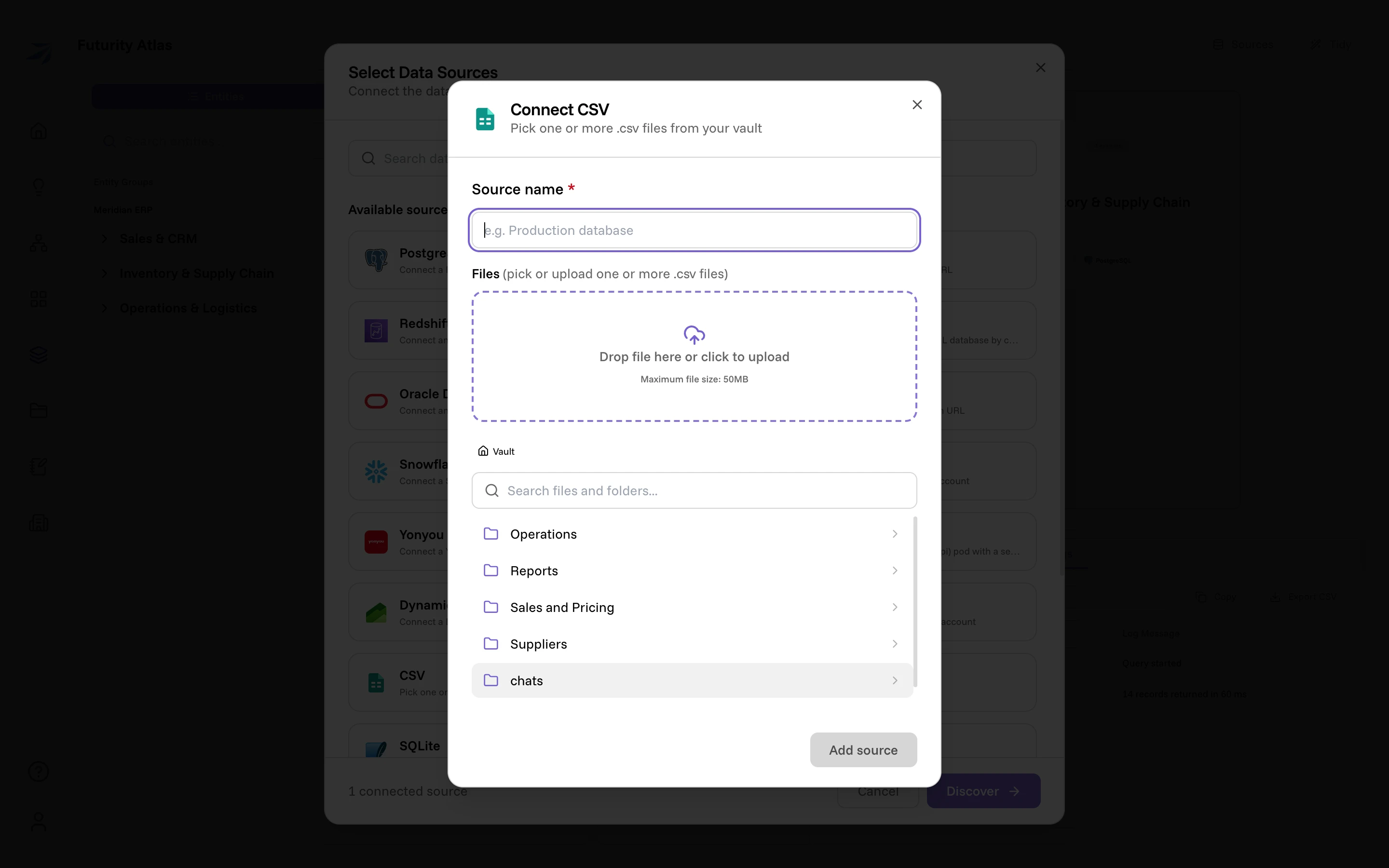
| CSV | Pick one or more .csv files from your vault | A name, and one file. Several files become one source each |
| Excel | Pick one or more .xlsx files from your vault | A name, and one file. Several files become one source each |
| SQLite | Pick one or more .sqlite files from your vault | A name, and one file. Several files become one source each |
| DuckDB | Pick one or more .duckdb files from your vault | A name, and one file. Several files become one source each |
| Google Sheets | Link a spreadsheet from a connected Google account | A name, your connected Google account, and a spreadsheet link or ID |
The four file kinds read from your Vault. The form lets you either drop a file in — it lands in the Vault — or browse to one that's already there. Uploads are capped at 50 MB per file.
Pick more than one file and the name field disappears: Atlas makes one source per file, named after the file, and shows you the mapping before you submit.
CSV and Excel files are read as a table, not as a grid of cells, so Atlas works
out where the table starts and where it ends. A trailing row whose first cell is
a totals label (Total, Totals, Subtotal:, Gesamt, and the equivalents in
the other languages it recognizes) is dropped, so summing that column doesn't
count the sheet's own total a second time. A cell that merely begins with one of
those words, Total Recall in a film list, is data and stays. Where the end of
the table had to be guessed, Atlas also drops a last row that looks like a
footer by shape, a lone value in a wide row or a mostly empty one; where the end
was detected outright, those rows are kept.
When a file can't be read, the reason comes back in words rather than as a generic failure, both on screen and to Corint: a CSV whose delimiter, quoting or column count doesn't hold up, a file larger than Atlas will read, or an .xlsx whose contents expand far past what the file itself declares, which is refused as corrupt or malicious. The message names the thing to check, so a file that can never parse doesn't get retried as though it might.
A file source is copied at discovery, not read live — which is why replacing the file means running discovery again to pick up the new version.
Connected accounts
Salesforce and Google Sheets bind to an account you connect, rather than to a credential you paste. The form has a Connect button that runs the provider's normal sign-in, and only offers the source once an account is attached. Google Sheets then wants the spreadsheet's link or ID, with a Test access button that confirms the sheet is reachable.
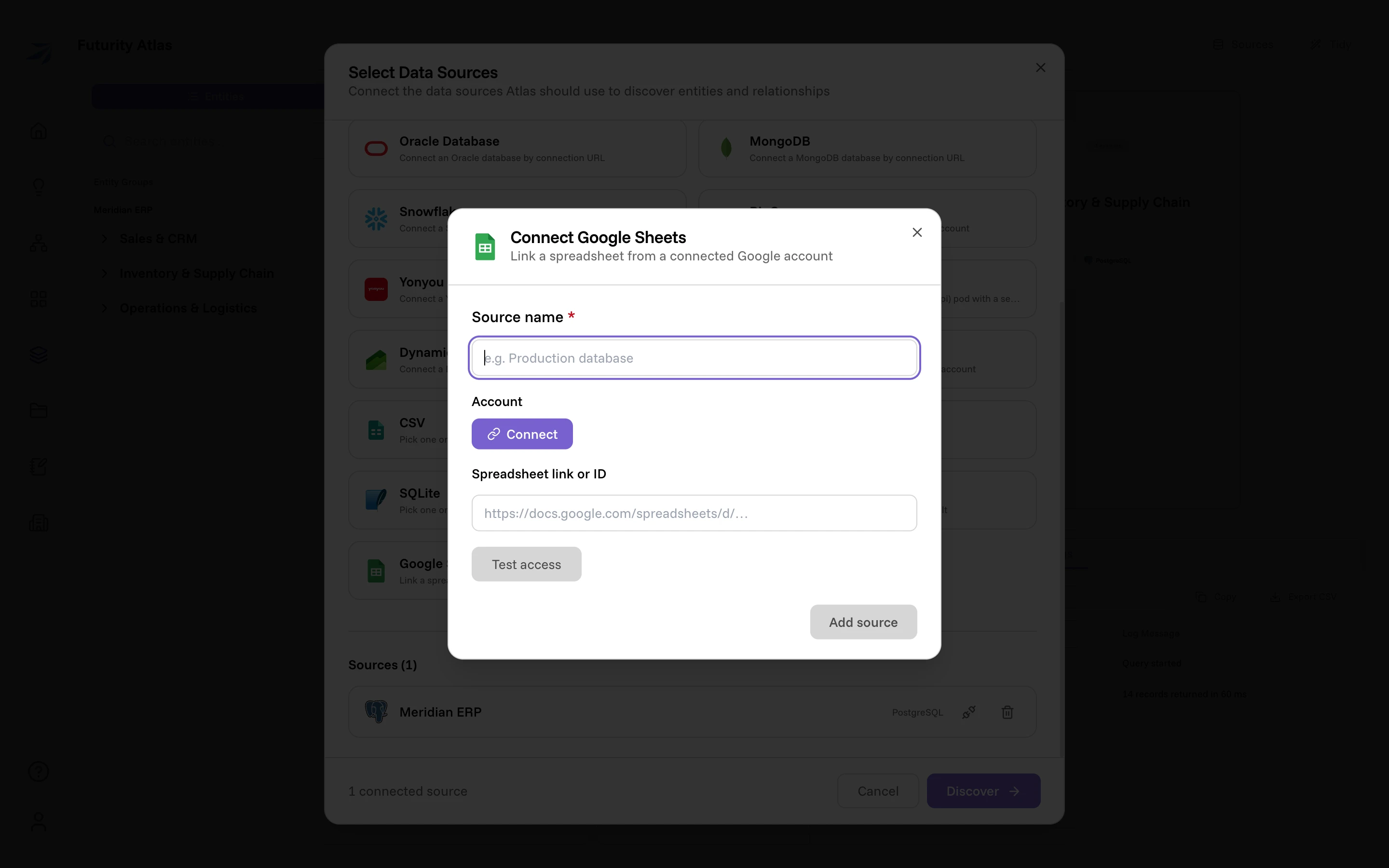
Both kinds are listed in Select Data Sources whether or not the provider is wired up in your Futurity instance — you find that out inside the form. Where the Account section would be, an unavailable provider says so instead: "This provider isn't available in your workspace yet."
External connectors
A third-party service that speaks the Atlas connector protocol, rather than a database or a vendor API Atlas knows first-hand. The External Connector card is on for every organization; an administrator can switch the Atlas External Connectors feature off per organization, which hides the kind and makes the API refuse it.
| Kind | What the dialog says | The form asks for |
|---|---|---|
| External Connector | Connect an external Atlas connector by base URL and token | Source name, base URL, token, your own upstream credentials, icon |
If you're the integrator building the service, Build an Atlas connector covers the protocol end to end.
The base URL is wherever the connector answers, path and all: Atlas reads
<base>/.well-known/futurity/atlas.json and calls every endpoint under that
same prefix, so one host can serve several connectors at different paths.
The token is the bearer the connector's integrator issued you, and must be
at least 32 characters. Read connector fetches the connector's public
capability document (atlas.json), confirms the base URL points at a real
connector, and renders one input per credential the connector asks for. Those
are your own upstream credentials, not the integrator's: the same hosted
connector serves every customer, and each one types their own. Changing the base
URL clears the document and anything typed against it.
Test connection then sends the token and those credentials to the
connector's /check. Green means both were accepted upstream; a rejection shows
the connector's own message, so a wrong password reads as the upstream's
complaint about it rather than a generic failure.
Pick an icon from the searchable list to represent the connector across Atlas; it defaults to a plug and is the only source kind whose icon you choose.
Atlas caches that capability document when you connect. Rebind on an active connector re-reads it and takes a fresh set of credentials, which is how you pick up a connector that has changed the entities or fields it exposes, or a credential that has rotated.
Right after you register or rebind a connector, Atlas runs its live conformance program in the background and the status chip reads verifying. When it finishes the chip moves to conformant or failed conformance, and on a failure the chip's tooltip carries the first failing check. A rebind runs the program again.