Discovery and review
What Atlas does with a source after you connect it, how to read the results, and how to correct them before anything goes live.
Connecting a source tells Atlas where your data is. Discovery is the step that works out what's in it. It runs on the server, reports progress while it goes, and ends with a screen that asks for your approval — nothing becomes queryable until you press Import Selected Entities.
Watching a run
Click Discover and the dialog becomes a live progress view titled Discovering your data model. It shows four things at once.
Overall progress — a percentage bar with a one-line description of what's happening right now, and a countdown that re-estimates itself as the run learns how fast your data actually is.
Three counters — rows profiled, entities named, links verified. They roll upward as the work lands, which is the quickest way to tell a busy run from a stalled one.
Sources — one row per source, each with a phase chip that moves through
queued → connecting → scanning → profiling → done, with a running
stat beside it: 12/40 tables, then row counts once the table sizes are
known. File sources pass through materializing as their contents are copied
in. A source that fails shows failed and the error, and the rest of the run
continues without it.
Understanding — the three passes that turn tables into something a person can read:
- Naming entities — each table gets a business name and a written description of its fields, their units, and their encodings.
- Grouping entities — the named entities are sorted into groups like Sales & CRM or Operations & Logistics.
- Verifying links — every relationship Atlas proposed is checked against the actual rows. A proposal that doesn't hold up is dropped here rather than shipped as a maybe. A foreign key is followed only inside the schema it was found in, so a database where two schemas hold same-named tables reports fewer relationships than it has keys, and the ones that remain point where the key really pointed.
Under all of that sits an activity feed of the last few things that happened, and a Stop discovery button. Atlas pauses its builder and query console while the run is active so an edit cannot collide with the model being discovered.
You can leave Atlas while discovery continues. A status pill stays in the lower-right corner throughout the dashboard; open it to return to live progress. You can dismiss the pill while a run is active without stopping the run. When discovery finishes, the pill returns in its completed state and a notification offers a Review now action. Reloading or opening another tab also recovers the current run from the server.
Not everything the feed reports is a failure. A warning lands there in amber and the run carries on, which is how a run tells you what it couldn't see. Tables the connecting login isn't allowed to read are still discovered, without example rows, and named in the warning so you know which grant would win them back. On PostgreSQL, Redshift, MySQL, and SQL Server, relations sitting outside the schema Atlas discovers are counted and named too, so tables that were never in scope are visible rather than quietly missing.
A run that goes quiet is flagged in the dialog — "This discovery looks stuck", with how long it's been silent — and one that stays silent long enough is failed out on its own so the next attempt isn't blocked. Your organization runs one discovery at a time.
The eight-table example on these pages takes about ten seconds end to end; a large ERP with millions of rows takes minutes.
Reading the results
When the run finishes with its progress dialog open, you land on Data Discovery & Sourcing, headed Review Discovery Results — "Review detected entities, field mappings, and relationships before importing them into Atlas." If you were elsewhere in the dashboard, open the completed status pill or the notification's Review now action to reach the same screen.
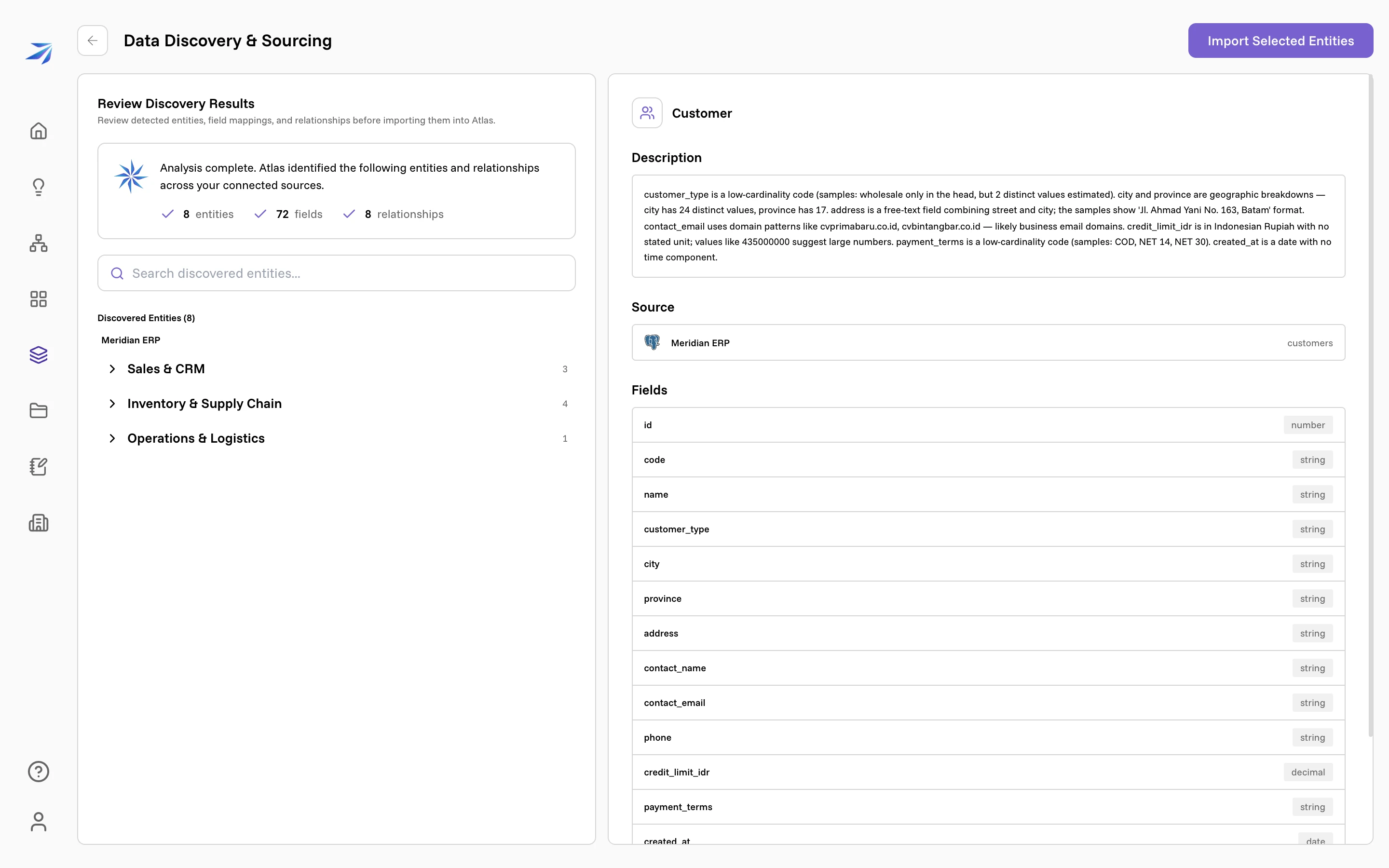
The summary counts what was found — entities, fields, relationships. Below it, the discovered entities are listed by source and group. On the right sits the entity you have selected, with three sections:
- Description — what Atlas wrote about this table, based on what it measured. This is the section worth reading properly.
- Source — which connected source and which table it came from.
- Fields — every field with its type.
The descriptions are specific because they come from measurements, not
guesses. The Customer entity here records that customer_type is a
low-cardinality code, that city has 24 distinct values, that
credit_limit_idr is in Indonesian Rupiah with no stated unit, and that
payment_terms takes COD, NET 14 or NET 30. Those sentences are what stop a
later answer from mixing currencies or inventing a category.
Choosing what to import
Expand a group and every entity carries a checkbox. Everything starts ticked.
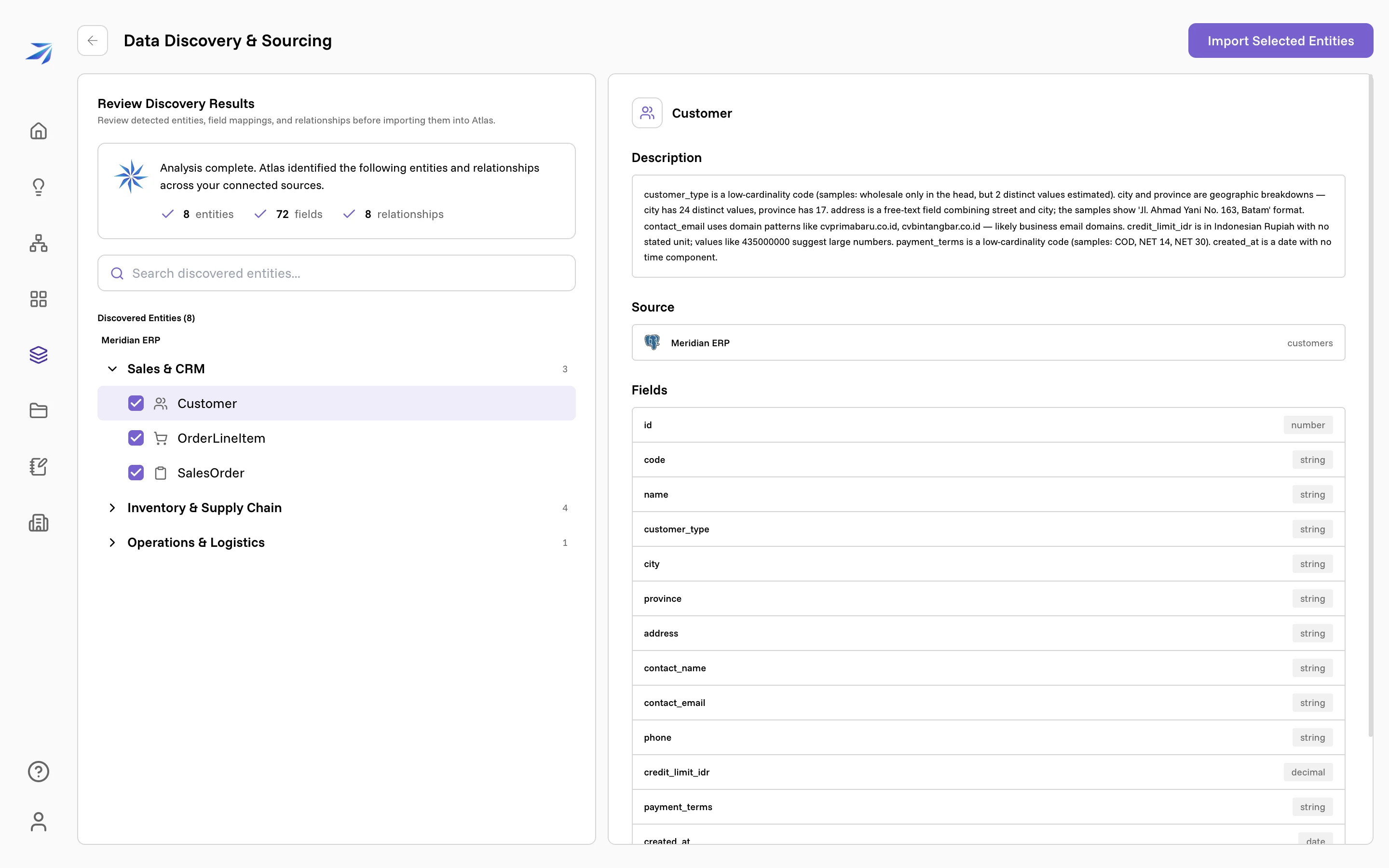
Untick anything that shouldn't be part of your organization's data model — migration leftovers, framework tables, a staging copy of a table you already have. A smaller, cleaner graph gives better answers than a complete one full of noise.
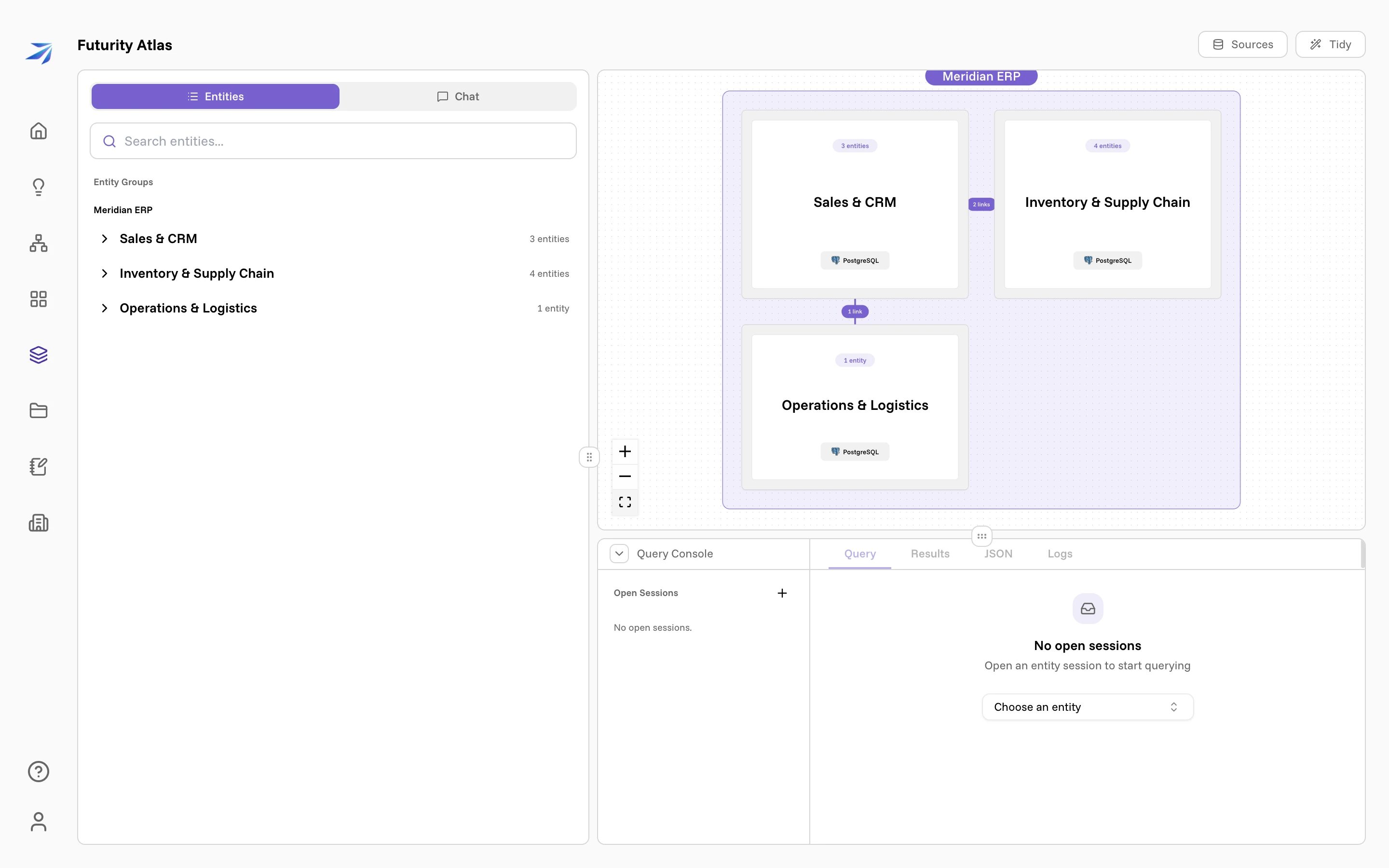
Then click Import Selected Entities. The review screen closes and the workspace opens on what you imported: entity groups on the left, a map of sources and groups on the canvas, and the query console below.
The back arrow beside the title does the opposite: it discards the results and leaves nothing behind, so you'd run discovery again from scratch.
Fixing what discovery got wrong
Review is a filter, not an editor. Corrections happen afterwards, in the workspace's Chat tab, where you can ask Atlas to rename an entity, rewrite a description, move it to a different group, add or remove a relationship, or delete an entity outright. Removing a link or an entity is destructive, so it asks you to confirm in the conversation first.
This is worth doing when something reads wrong. Description quality is the single biggest lever on whether later answers are right.
Adding a source later
Open Sources, connect the new system, and click Discover again. The run covers everything connected, but entities whose structure hasn't changed keep the descriptions they already have, so adding one source costs roughly the work of that one source.
This is also when Atlas looks for relationships between systems — an order id in your ERP matching an order id in your logistics platform. Cross-source links like those can't be proven in a single query the way same-source ones can, so they arrive as proposals the assistant checks against real rows before it leans on them.